The term "cinematic" gets thrown around a lot in photography and filmmaking. But what does it actually mean? More importantly, how can you achieve that high-end, Hollywood look using just an Android smartphone?
Cinematic photography isn't just about putting black bars on the top and bottom of an image, or slapping on a heavy teal-and-orange filter. True cinematic imagery relies on lighting, depth, composition, and a specific approach to color grading. In this guide, we'll break down the core elements of the cinematic aesthetic and how you can master them using LeafyCam.
1. Directional Lighting is Everything
Think about the last movie you watched. Rarely is a subject lit perfectly from the front with bright, flat light. Cinematic lighting is dramatic, directional, and often high-contrast.
Embrace Shadows
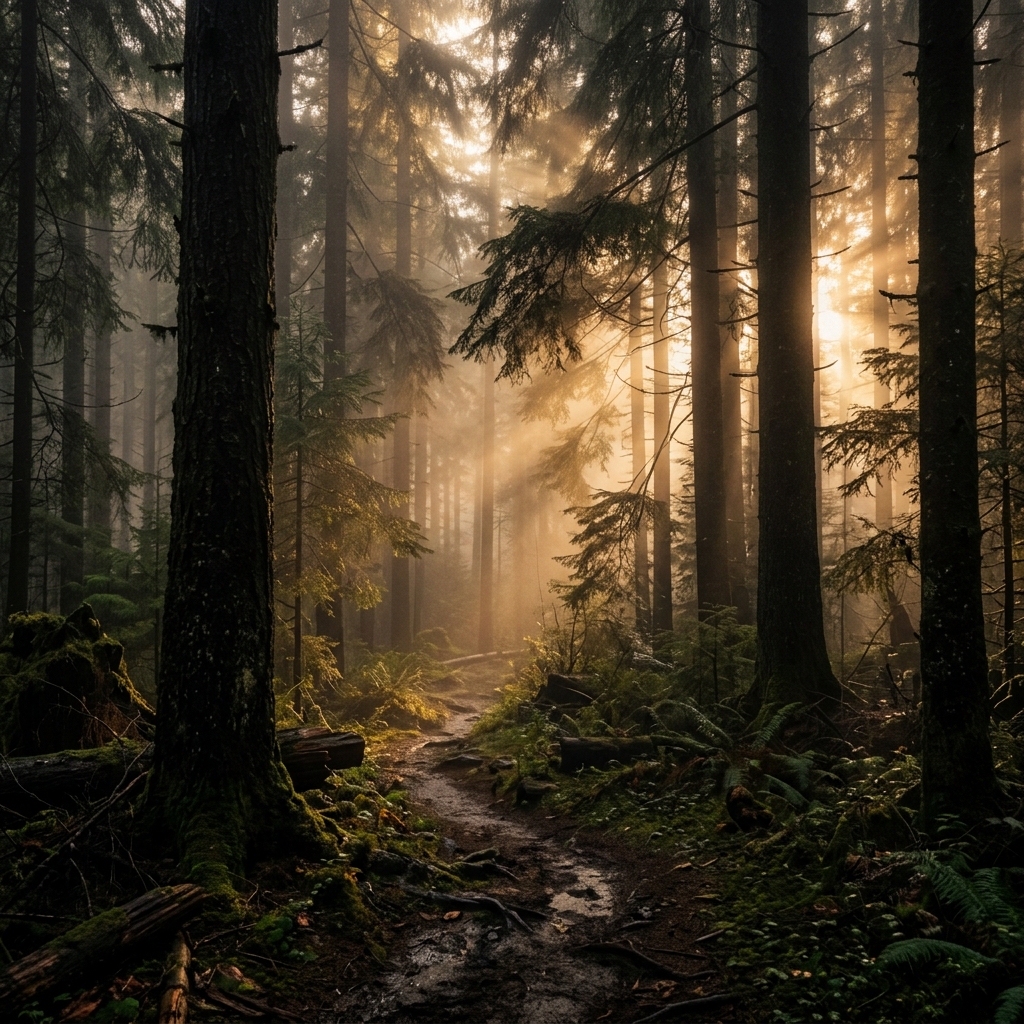
In mobile photography, the instinct is often to lift shadows so everything is clearly visible. This destroys the cinematic mood. Shadows provide depth, mystery, and shape. When shooting a forest, allow the deep woods to fall into darkness. Expose for the shafts of light hitting the leaves.
Side Lighting and Backlighting
Shoot during the early morning or late afternoon (the Golden Hour) when the sun is low on the horizon. This creates long shadows (side lighting) or dramatic silhouettes and rim lighting (backlighting). LeafyCam includes a Golden Hour widget that alerts you exactly when this optimal lighting occurs based on your GPS coordinates.
2. The Cinematic Aspect Ratio
Most smartphone sensors shoot in a 4:3 aspect ratio. This is great for printing standard photos, but it doesn't feel like a movie. Movies are shot in widescreen formats, typically 2.35:1 or 2.39:1.
While you can crop your 4:3 images later, it is much better to compose your shot with the cinematic ratio in mind. In LeafyCam, you can change your viewfinder aspect ratio to 2.35:1 Cinematic. This forces you to think about horizontal composition, utilizing leading lines that stretch across the frame rather than vertical elements.
Pro Tip: Shoot Wide, Crop Later
If you aren't sure about the framing, shoot in RAW 4:3 to capture the entire sensor, but use LeafyCam's cinematic guide overlays to help you visualize the final widescreen crop.
3. Creating Depth (Even Without a Big Sensor)
One of the hallmarks of cinema cameras is their large sensors, which create a shallow depth of field (blurry backgrounds, sharp subjects). Smartphones have very small sensors, which naturally keep everything in focus.
How do we overcome this?
- Foreground Elements: Always include something in the immediate foreground of your shot (like a branch, some leaves, or a rock). If you place your phone very close to the foreground object and focus on the background, the foreground will naturally blur out, creating a sense of depth and scale.
- Use the Telephoto Lens: If your Android device has a dedicated optical telephoto lens (3x or 5x), use it. Longer focal lengths naturally compress the background and create a slightly shallower depth of field compared to wide-angle lenses. LeafyCam fully supports auxiliary telephoto lenses via the Camera2 API.
4. Cinematic Color Grading
This is where the magic happens. A cinematic color grade unites the image, creating a specific emotional response. Modern films rarely leave colors exactly as they appear in real life; they are shifted into specific palettes.
The Color Palette
The most famous cinematic palette is Teal and Orange, because human skin tones fall into the orange spectrum, and teal is the complementary color on the color wheel, creating maximum contrast. For nature photography, we often look for a Moody Green and Brown palette, heavily desaturating bright yellows and shifting greens toward a darker, cooler tone.
Using LUTs in LeafyCam
A Look-Up Table (LUT) is a complex mathematical file that remaps colors from one value to another. This is what professional colorists use in Hollywood. LeafyCam brings this technology to your phone in real-time.
Instead of shooting a flat photo and trying to guess the color grade later, you can select the "Cinematic Forest" LUT within LeafyCam. Instantly, your viewfinder will reflect the final color grade. The app processes this 3D cube matrix with zero shutter lag. If you prefer to grade later, LeafyCam captures an uncompressed RAW DNG file simultaneously.
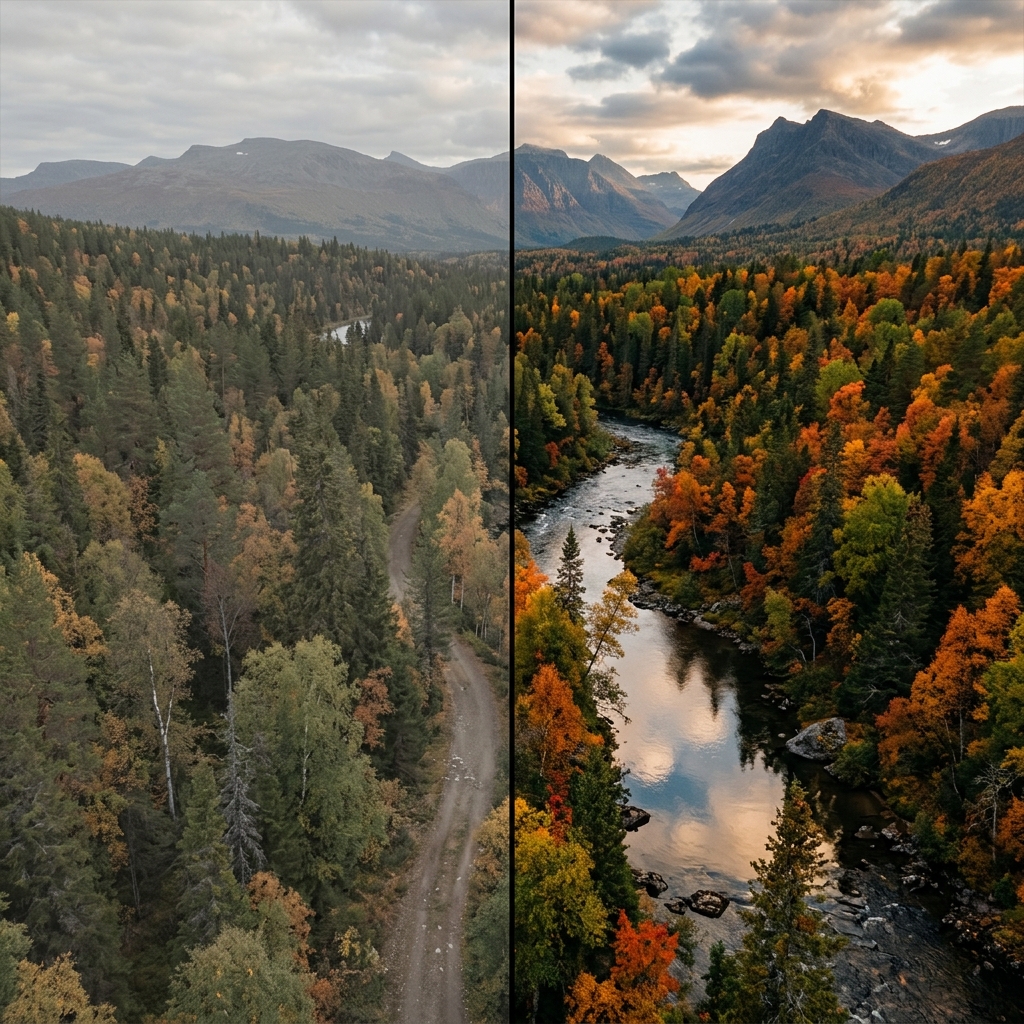
Real-time color grading using LeafyCam's LUT engine.
5. Softness and Halation
Digital smartphone cameras are incredibly sharp. Often, they are too sharp. The software applies aggressive sharpening algorithms that make images look brittle and digital.
Cinematic film, however, is slightly softer and exhibits "halation"—a red/orange glow around bright highlights (like the sun or a lightbulb). To achieve this look on mobile:
- Turn off Digital Sharpening: Shoot in RAW. RAW files do not have the phone's artificial sharpening applied.
- Use LeafyCam's Diffusion Effect: In the Pro version, you can apply a subtle digital diffusion effect that blooms the highlights gently, mimicking classic cine lenses like the Blackmagic or Arri Master Primes.
Conclusion
Achieving a cinematic look on a mobile device is entirely possible. It requires a shift in mindset: embrace dark shadows, compose for widescreen, utilize foreground elements, and most importantly, take control of your color grading.
With LeafyCam, you have a pocket cinema camera designed specifically for the wilderness. Download it today and start creating art, not just snapshots.